

 Control the voltage
The main PSU voltage output can be set anywhere between the minimum of 2.0V and the maximum of 22.0V.

The LVT-PSU is available as a standalone desktop unit in a form factor suitable for use in the lab, with controllable power supply software supplied. It can be controlled using its front panel, CAN messaging, an analogue input or the supplied GUI; created using our real-time interface creation software VISUALCONNX.
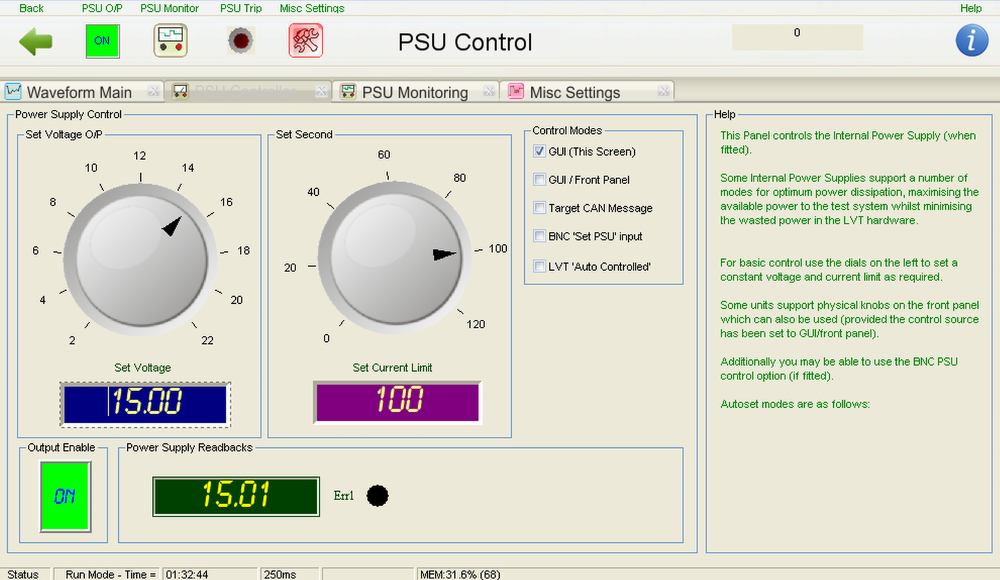 LVT-PSU GUI
The PSU Control Form within the LVT-PSU GUI is one of the ways of controlling the LVT-PSU, by using the Control Form to set the control modes, output voltage and more. The LVT-PSU GUI is installed onto a host PC and communicates with the LVT-PSU via our CAN USB interface COMMDongle. Discussion of the control elements of the GUI follows below.
Control the voltageThe main PSU voltage output can be set anywhere between the minimum of 2.0V and the maximum of 22.0V.
 Control the current limit
The PSU current limit can be set anywhere between the minimum of 0 and the maximum of 125A d.c.
 Monitor the actual voltage readback
You can define the rate at which the voltage is monitored and monitor the actual voltage readback via the control screen, which defaults at 25ms.
 Enable or disable the main output
The PSU’s output stage can be turned on and off via the output enable when controlled via the GUI. To turn the PSU off in totality, you can switch the main power button off on the system’s front panel.
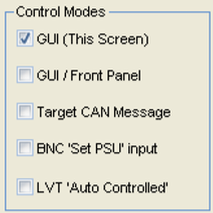 Set the PSU control mode
The PSU control board supports a number of options for voltage control depending on your model, such as via the GUI, via the GUI and Front Panel, via CAN Message, via BNC Input or it can be controlled by an LVTGO-VBS unit when being used for controller robustness testing.
Interested?Leave your details below to receive a copy of our latest product line card: |

VISUALCONNX is a software package that allows engineers to create interfaces for HIL and RCP systems, often without programming. It can be used for control and diagnostic purposes and analysis with any real-time system. You can feed parameter blocks in Simulink® and receive signals from models with VISUALCONNX.

Hardware-in-the-loop (HIL) testing is a test methodology that can be used throughout the development of...
Find out more
A summary of some of the key steps involved when testing embedded control systems....
Find out more
We often get asked “why can’t I use a power supply to do this test?”....
Find out more
In today’s modern electrical environments it is becoming more and more likely that the complexity...
Find out more